
High Impressions but Low Clicks? A Complete SEO Diagnostic Checklist to Find the Exact Cause
When you open Google Search Console, you see thousands of impressions. But the number of clicks is so low that you can count them on your fingers…
This situation creates a lot of confusion for many website owners. “Google is showing my website to people. Then why isn’t anyone clicking on it?” “Is there something wrong with my SEO?” “Is my content not good enough?” “Is there a problem with my title?” “Am I targeting the wrong keywords?” “Is Google not ranking my page properly?”
Questions like these naturally come to mind.
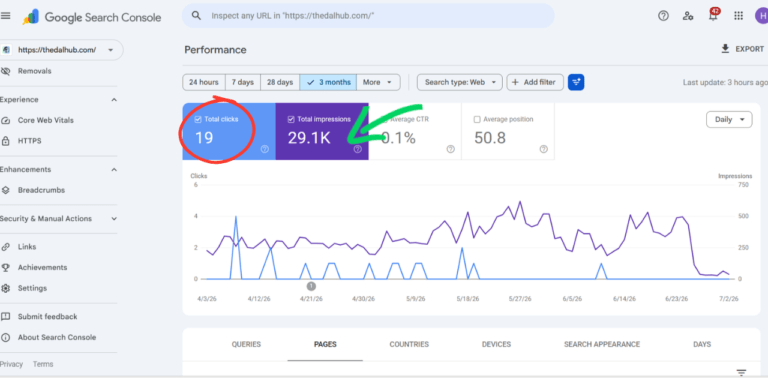
In reality, High Impressions + Low Clicks is not just a problem. It’s an important signal from Google. In other words,
“Google: I’m showing your content in the search results. But people searching on Google don’t want to click on it.”
There isn’t just one reason for this. Sometimes it’s the title. Sometimes it’s the meta description. Sometimes it’s the search intent. Sometimes it’s your ranking position. And in some cases, your competitors may simply have more attractive search results than yours.
That’s why you first need to find out which reason—or combination of reasons—is actually causing the problem. Making changes without identifying the real cause is like shooting an arrow in the dark.
In this article, we’ll go through a complete Diagnostic Checklist to help you identify the exact reason why your website is getting high impressions but not the clicks you expected.
We’ll cover, step by step:
- What should you check?
- Why should you check it?
- How do you identify the problem?
- Which metrics should you look at?
- Where can you find them in Google Search Console?
- How do you know that this particular issue is affecting your page?
Let’s get started.
What Does High Impressions but Low Clicks Mean?
Before diagnosing the problem, you first need to clearly understand these two metrics.
Impression
Whenever someone searches on Google and your webpage appears in the Google Search results, it counts as one impression.
It could appear on the first page… Or even on the last page. Whether the user clicks on it… Or doesn’t click at all… It still counts as an impression.
Click
When someone clicks your link in the search results and visits your website, it counts as a click.
For example:
- Impressions – 12,500
- Clicks – 15
What does this mean?
Google has shown your page 12,500 times. But only 15 people decided to open it. This is exactly the situation you need to diagnose.
The Most Important Thing You Should Do First
This is where many people make a mistake. As soon as an article doesn’t get enough clicks, they immediately:
- Change the title.
- Rewrite the meta description.
- Rewrite the content.
Before doing any of that, you should first diagnose the problem—just like a doctor would. A doctor doesn’t prescribe medicine the moment a patient walks in.
First, they look at:
- Symptoms
- Blood tests
- Scan reports
Only then do they identify the actual cause. Website SEO is no different. Diagnosis is extremely important.
Checklist 1 – What Is Your CTR (Click-Through Rate)?
This is the very first thing you should check.
CTR is calculated as: Clicks ÷ Impressions × 100
Example: 10,000 Impressions, 100 Clicks
CTR = 1%
How to Check Your CTR?
Open Google Search Console. Go to the Performance.
Then look at:
✔ Total Clicks
✔ Total Impressions
✔ Average CTR
✔ Average Position
After that, open the Pages or Queries tab to check the CTR for individual pages or search queries.
How Should You Interpret It?
If your CTR is very low, it means people are seeing your search result but aren’t interested in clicking on it. There could be several reasons for this.
- Title
- Meta description
- Position
- Search intent
- Competition
CTR is only a symptom. It is not the actual cause. That’s why you need to continue with the next checklists.
Checklist 2 – What Is Your Average Position?
One of the biggest reasons for a low CTR is your average position. Check the Average Position metric in Google Search Console. See this article for Best Rank Tracking Tools|Compare and Track Your SEO Progress
How Should You Interpret Your Position?
>> Position 1–3
Your CTR should generally be high. If you’re still not getting clicks here, there’s a good chance the problem is your title or search snippet.
>> Position 4–10
You can still get clicks. However, you shouldn’t expect as many clicks as positions 1–3. A lower CTR here is completely normal.
>> Position 11–20
This usually means you’re on the second page of Google. You may still get plenty of impressions. But clicks are usually very low. That’s because most people never go to the second page.
>> Position 30+
Your page is appearing much lower in the search results. You may still receive impressions. But getting very few or no clicks is completely normal because most users never go beyond the first page.
An Important Observation:
Don’t change your title just because your CTR is low. First, check your average position. If your average position is around 35, changing your title alone is unlikely to make a significant difference.
In that situation, your priority should be improving your rankings first.
Checklist 3 – Which Search Queries Are Generating Impressions?
This is one of the most important diagnostic steps. Your page may be getting a lot of impressions. But which search queries are generating those impressions? You need to find that out.
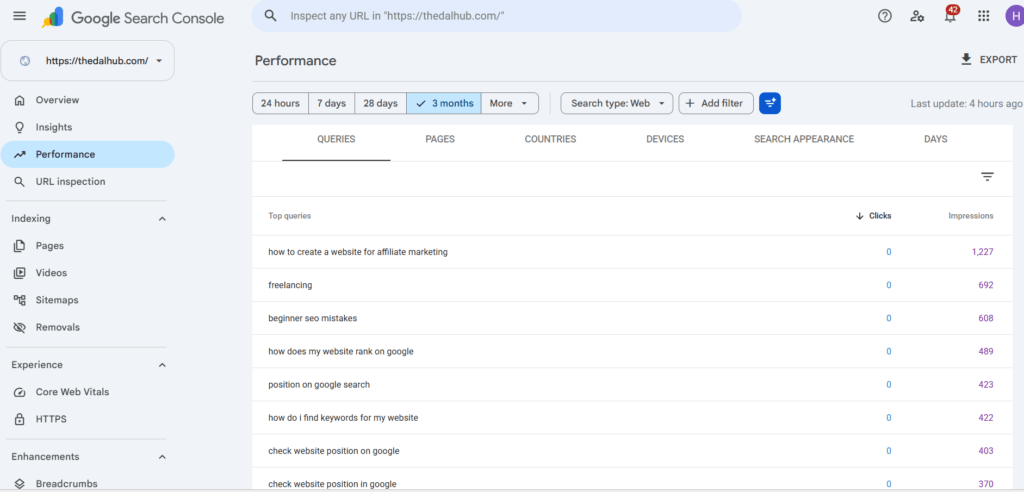
How to Find Out?
Open Google Search Console. Go to: Performance → Queries
The queries generating the highest number of impressions will appear at the top. Simply click on a query, and Google Search Console will automatically show you which page is receiving impressions for that query.
What Should You Look For?
Which search queries is Google using to show your page?
For example,
Article Title: “Best Affiliate Marketing Website Guide”
But the queries are:
- affiliate examples
- affiliate meaning
- affiliate logo
- affiliate jobs
What does that tell you?
Google is showing your content for a different purpose than you intended. As a result, your clicks may be low. This Is Called “a Search Intent Mismatch”.
In other words, Google is showing your content. But the people searching are expecting something different.
Checklist 4 – Does Your Content Match the Search Intent?
One of the most important factors in SEO is search intent. Choosing the right keyword alone isn’t enough. What really matters is what the searcher expects to find.
Example:
Keyword: “Affiliate Marketing”
When someone searches for it, they may expect to learn:
- What is affiliate marketing?
- How do I get started?
- How much can I earn?
But what if your article only talks about the history of affiliate marketing?
Google may still show your page.But people are unlikely to click it. Because it isn’t what they were searching for.
How to Check This?
Search your target keyword on Google. Look at the top 10 results. Are they:
- Guides?
- Tutorials?
- Comparisons?
- Reviews?
Now compare them with your own content. If almost every top-ranking page is a how-to guide, but your article only explains the definition, there’s a high chance your content doesn’t match the search intent.
Checklist 5 – Does Your Title Actually Make People Want to Click?
When someone sees your page in Google Search results, the very first thing they notice is your title. The next thing they see is the meta description. They haven’t seen your content yet.
So your title creates the first impression.
What Makes a Good Title?
✔ It should be clear.
✔ It should reflect the search intent.
✔ It should include the target keyword.
✔ It should create curiosity.
✔ It should give people a reason to click.
Example:
A simple title: “Affiliate Marketing Guide”
Instead of that,
“How to Start Affiliate Marketing: A Complete Step-by-Step Guide for Beginners (2026)”
is much more likely to attract clicks. Because it clearly tells readers what they’ll get from the article.
How to Identify This?
Search your target keyword on Google. Write down the titles of the top 10 results. Then compare your title with them. Now ask yourself one simple question:
“If I were an ordinary user, would I click on my own title among these 10 search results?”
If your honest answer is “No,” then your title probably needs improvement.
But remember: Changing your title alone is not the solution. It’s only one part of the entire diagnosis.
Checklist 6 – Does Your Meta Description Actually Encourage People to Click?
After looking at the title, the next thing users notice is the meta description. Although it is not a direct ranking factor, it can play an important role in improving your CTR.
A good meta description should immediately tell users two things:
- What is this article about?
- What benefit will they get if they click on it?
How can you Identify This?
Search your target keyword on Google. Carefully read the meta description shown for your page. Then compare it with the top five search results. Ask yourself these questions:
- Is my description clear?
- Does it naturally include the target keyword?
- Does it clearly explain the benefit to the reader?
- Does it make people want to click?
Is Google Rewriting Your Meta Description?
This is something many people don’t know. Google doesn’t always display the meta description that you wrote. Sometimes, it automatically selects a different section from your article and displays that instead.
If this happens, it may indicate that Google found another part of your page to be more relevant for that particular search.
What Should You Do?
When writing a meta description:
- Include your target keyword naturally.
- Keep it around 140–160 characters.
- Clearly mention the benefit readers will get.
- Avoid unnecessary keyword stuffing.
Checklist 7 – How Does Your Search Snippet Look in Google Search Results?
Sometimes, both your title and meta description may be good. But your search result still doesn’t look attractive. The reason could be your search snippet appearance.
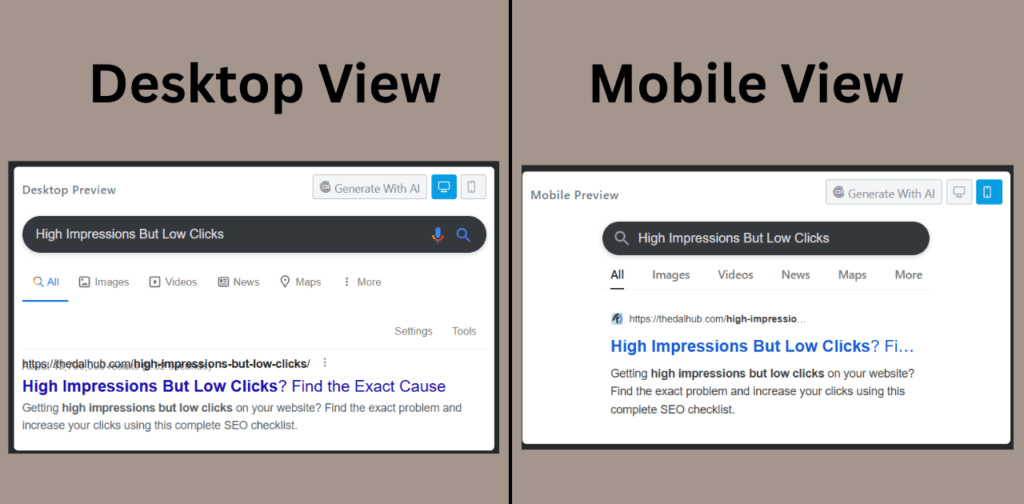
How to Verify It
Search your target keyword on Google. Then look at your search result as if you were an ordinary user. Ask yourself:
- Does it look professional?
- Does it look clean?
- Is any part of it truncated?
- Is the full title visible?
Things You Should Check
- Is your title getting cut off?
- Is your meta description incomplete?
- Does the date look outdated?
- Is your URL difficult to understand?
All of these can affect your CTR.
Checklist 8 – Why Are Your Competitors Getting More Clicks Than You?
This is a very important analysis. Many website owners only look at their own article. But you’re not competing alone on Google. You’re competing with hundreds of other websites.
How to Find Out?
Search your primary keyword on Google. Open and check the top 10 results. Then compare each of the following.
Comparison Checklist:
✔ Title
✔ Meta Description
✔ URL
✔ Publish Date
✔ Updated Date
✔ Images
✔ FAQ
✔ Table of Contents
✔ Rich Snippets
✔ Content Length
✔ Headings
✔ Overall Quality
Ask Yourself
- Why should someone click my result instead of this one?
- What value am I offering?
- What makes my content unique?
If you can’t answer these questions, your search result may simply blend in with the rest.
Checklist 9 – Is Keyword Cannibalization Affecting Your Website?
This is one of the most overlooked problems in SEO. If you publish two or three articles targeting the same keyword, Google may become confused. It may not clearly understand which page should rank.
Example:
One article: “Affiliate Marketing Guide”
Another article: “Affiliate Marketing for Beginners”
Another article: “Affiliate Marketing Tutorial”
If all three pages have almost the same search intent, they may start competing against each other.
How to Identify This one?
In Google Search Console, check whether multiple pages are getting impressions for the same query. Or use this search on Google:
yourwebsite.com "affiliate marketing"
If multiple pages appear for the same keyword, review them carefully.
What Should You Do?
- Merge unnecessary pages.
- Build proper internal links.
- Give each page its own unique search intent.
Checklist 10 – Is Your Content Actually Helpful?
Today, Google gives more importance to content quality than simply counting keywords. If users click your article and leave within a few seconds, that’s generally not a good sign.
Evaluate Your Content Honestly
Ask yourself these questions:
- Does it completely answer the user’s question?
- Does it include practical examples?
- Does it provide step-by-step instructions?
- Is it easy for beginners to understand?
- Does it include images, tables, or diagrams where necessary?
- Does it include an FAQ section?
- Does it have a proper conclusion?
A Good Article…
should provide most of the information readers need in one place, without forcing them to visit another website immediately. That’s what helpful content is all about.
Checklist 11 – Do You Have Strong E-E-A-T Signals?
Today, Google doesn’t evaluate only the content. It also evaluates the person or source behind that content.
This is known as E-E-A-T.
It stands for:
- Experience
- Expertise
- Authoritativeness
- Trustworthiness
How can you Verify It?
Does your website include the following?
- Author Page
- About Page
- Contact Page
- Privacy Policy
- Reliable Sources
- Original Images
- Real Experience
- Updated Information
Example:
Instead of saying,
“I’m writing about SEO based on what I read online.”
Try saying something like,
“I used this method on my own website and increased my CTR from 1.2% to 4.8%.”
That builds much more trust with both Google and your readers.
Checklist 12 – Is Your Mobile Experience Good Enough?
Today, most users search on mobile devices. A website that looks great on desktop may be difficult to use on mobile.
How to Check This?
Open your website on different mobile devices. Pay attention to the following:
- Is the text too small?
- Are the buttons difficult to tap?
- Do images overflow the screen?
- Are there too many pop-ups?
- Do ads cover the content?
User Experience Matters
The moment someone visits your website, they should feel:
“This website is easy to use.”
That’s what a good user experience is.
Checklist 13 – How Fast Does Your Website Load?
If your website loads slowly, many visitors won’t wait. They’ll simply press the Back button and visit another website instead. This can indirectly affect your overall SEO performance.
How to Check This?
Use tools such as Google PageSpeed Insights and review metrics like:
- Mobile Score
- Desktop Score
- Core Web Vitals
- Largest Contentful Paint (LCP)
- Interaction to Next Paint (INP)
- Cumulative Layout Shift (CLS)
Ways to Improve Website Speed:
- Compress your images.
- Use the WebP image format.
- Remove unused plugins.
- Enable browser caching.
- Use a good hosting provider. See this article “How to Choose a Web Hosting Provider“
Checklist 14 – Is Your Internal Linking Done Properly?
Having just one good article on your website isn’t enough.That article should also receive support from other pages on your website.That’s exactly what internal links are for.
An internal link is simply a link that connects one page on your website to another page on the same website.It helps both Google and your visitors understand the structure of your website.
What Happens If You Don't Have Internal Links?
Imagine you publish a new article but don’t link to it from anywhere else on your website. Even if Google discovers that page, it may take longer to fully understand how important it is.
At the same time, visitors are also more likely to leave your website after reading just that one page.
How to Identify This?
Open your article and ask yourself these questions.
- Is this article receiving internal links from other articles on my website?
- Have I linked this article to other relevant articles?
- Is the anchor text natural?
A Good Example:
Suppose you’ve written an article called: “How to Build an Affiliate Marketing Website?” From that article, you could naturally link to related articles such as:
- Best Web Hosting
- SEO Basics
- Keyword Research Guide
- WordPress Setup
This not only gives readers additional information but also helps Google understand how your pages are connected.
Checklist 15 – Do You Have Rich Results and Structured Data?
In Google Search results, some pages appear as ordinary search listings. Others include additional information such as:
- FAQ
- Breadcrumb
- Star Rating
- How-to Steps
- Product Information
These are known as Rich Results.
How Does This Affect CTR?
Imagine there are two search results.
- The first result contains: A normal title and meta description.
- The second result contains: A title, FAQ section, breadcrumb, and additional information.
Which one do you think an average user is more likely to click? Most people will probably choose the second result. Because it provides more information before they even open the page.
How to Check This?
Search your target keyword on Google. Then check whether your search result includes:
- An FAQ section
- A Breadcrumb
- Any Rich Result or structured information
If you’re using WordPress, you can also check whether your Schema markup is properly configured using plugins such as Rank Math or Yoast SEO.
Checklist 16 – Is Google Showing Your Page to the Right Audience?
This is a very important reason that many people never think about. Sometimes Google may show your page for search queries that aren’t actually relevant. As a result, your impressions increase. But your clicks don’t.
Example:
Suppose your article is:
“How to Start Affiliate Marketing for Beginners.”
But Google is also showing it for searches like:
- Affiliate Logo
- Affiliate Meaning
- Affiliate Companies
- Affiliate Jobs
The people searching these queries have a completely different goal. Your article has a different purpose. Because of that, your page receives impressions. But it doesn’t receive clicks.
How to Find Out this?
Open: Google Search Console → Performance → Queries
Go through the queries that are bringing impressions to that page. Then ask yourself one simple question.
“Is someone searching this query actually looking for my article?”
If your answer is No, then you should improve your Search Intent Alignment.
Checklist 17 – Could This Be a Seasonal Keyword?
Not every keyword has the same search volume throughout the year. Some keywords become popular only during certain seasons or events.
Example:
- Black Friday Deals
- IPL Schedule
- Mother’s Day Gifts
- Ramadan Recipes
- Christmas Decorations
Keywords like these may receive a large number of impressions during certain months. And much fewer impressions during others. That doesn’t necessarily mean there’s an SEO problem.
How to Identify This?
In Google Search Console, compare different date ranges such as:
- Last 3 Months
- Last 6 Months
- Last 12 Months
If traffic increases only during a specific period every year, it could simply be a seasonal pattern.
Checklist 18 – Does Your Website Have Enough Authority and Backlinks?
Sometimes your content may be excellent. Your title may be strong. Your search intent may be perfectly aligned. But your rankings still don’t improve. Why?
Your competitors may simply have higher website authority. Google may give more visibility to websites that it considers more trustworthy.
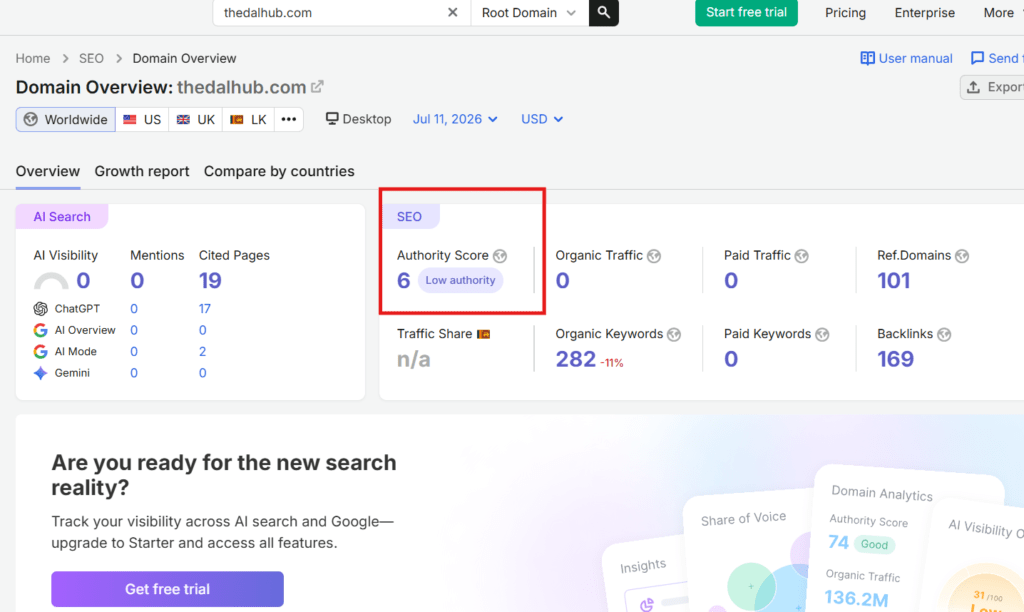
How to Identify This?
Study your competitors and compare the following:
- Website Age
- Number of Quality Backlinks
- Brand Recognition
- Topical Authority
- Content Depth
This doesn’t mean a new website can never rank. Not at all. However, a new website usually needs:
- More helpful content
- Better internal linking
- High-quality backlinks
- Consistent content publishing
to compete effectively with more established websites.
Complete SEO Diagnosis Flow
Now let’s combine everything we’ve covered so far into a simple decision-making process. Whenever your website gets high impressions but very few clicks, follow this workflow in the same order.
>> Step 1
Check your CTR. Is your CTR very low?
✔ Yes → Go to Step 2.
✘ No → Investigate other SEO metrics.
>> Step 2
What is your Average Position?
- Position 1–3
- Position 4–10
- Position 11–20
- Position 20+
Write this down first.
>> Step 3
If your page is ranking in Positions 1–3 but your CTR is still low, the first things you should investigate are:
- Title
- Meta Description
- Rich Results
- Competitor Snippets
>> Step 4
If your page is ranking at Position 11 or lower, your first priority should be improving your rankings. To do that, focus on:
- Content Quality
- Internal Links
- Backlinks
- Search Intent
- Topical Authority
>> Step 5
Analyze your Search Queries. Is Google showing your page for the right keywords? Or is it also showing it for unrelated queries?
>> Step 6
Compare your page with your competitors. Then answer this question honestly.
“If I were a new user searching on Google, why would I click on mine instead of my competitor’s result?”
The answer to that question will often tell you exactly where your next optimization should begin.
Priority Action Plan – What Should You Fix First?
Many website owners try to fix everything at the same time. That’s not a good approach. When you make multiple changes at once, it becomes difficult to know which change actually made a difference.
Whenever one of your pages isn’t getting enough clicks, go through this checklist in order.
Quick SEO Diagnosis Checklist >>
- What is the CTR?
- What is the Average Position?
- Which search queries are generating impressions?
- Does the content match the Search Intent?
- Is the title compelling?
- Is the Meta Description clear
- What are your competitors doing differently?
- Is the content complete and genuinely helpful
- Does the page have enough Internal Links?
- Is it eligible for Rich Results?
- Is the Mobile Experience good
- Does the page load quickly?
- Does your website have enough Authority and Quality Backlinks?
By following this checklist for every important page, you’ll be able to identify problems based on data instead of making assumptions.
In the previous parts, we explored all the major reasons why a website may receive high impressions but very few clicks.Now, let's turn that knowledge into a practical action plan.You can use this section as an SEO Maintenance Guide. Whenever a particular page isn't getting enough clicks, simply follow this checklist and evaluate each factor one by one.
30-Day SEO Optimization Checklist
SEO isn’t something that gets finished in a single day. Likewise, expecting immediate results after making a change isn’t the right approach either.
Instead, if you follow a structured plan, it becomes much easier to understand which changes actually made a difference.

Week 1 – Focus Only on Diagnosis
During the first week, don’t make any changes. Start by collecting the data.
Review the following metrics:
- Total Impressions
- Total Clicks
- CTR
- Average Position
- Top Queries
- Top Pages
Then create a separate list of the pages with the lowest CTR. For each of those pages, analyze:
- What is the average position?
- Which queries are generating impressions?
- Does the content match the search intent?
The goal of this week is only to identify the problem.
Week 2 – Optimize Your Search Results
Now it’s time to improve the elements that users see in the search results. For example:
- Rewrite the title.
- Rewrite the meta description.
- Review your URL structure (if necessary, make improvements only for new pages rather than changing existing URLs).
- Add FAQ Schema.
- Add Breadcrumb Schema.
- Optimize important sections for Featured Snippets where appropriate.
Don’t update 30 pages at once. Instead, focus on your 5–10 most important pages first.
Week 3 – Improve Your Content
Now evaluate the content itself. Ask yourself these questions.
- Does my article provide more complete information than my competitors?
- Should I add new information?
- Can I include a step-by-step guide?
- Should I add images, tables, or comparison charts?
- Is there an FAQ section?
- Are there enough practical examples?
Don’t add unnecessary paragraphs just to make the article longer. Every section should answer at least one important question your readers have.
Week 4 – Build Your Website's Authority
During this week, focus on strengthening your website as a whole. Things to do:
- Add more internal links.
- Fix broken links.
- Update older articles.
- Publish new helpful content.
- Work on earning quality backlinks.
After making these improvements, give Google at least 3 to 6 weeks to crawl, process, and evaluate the changes.
The 10 Most Common Mistakes Website Owners Make
These are some of the mistakes that appear again and again across many websites.
1. Making Decisions Based Only on CTR
Don’t change your title just because your CTR is low. Always check your Average Position first.
2. Changing Everything at Once
Some website owners update everything on the same day:
- Title
- Meta Description
- Content
- Images
- Internal Links
When you make all these changes at once, it becomes impossible to know which change actually improved your results.
3. Ignoring Your Competitors
You’re not competing alone on Google. Always pay attention to what the pages ranking above you are doing.
4. Ignoring Search Intent
Even if you’ve chosen the right keyword, your CTR won’t improve if your content doesn’t match the user’s search intent.
5. Using Clickbait Titles
Don’t write misleading titles just to attract more clicks. If users feel disappointed after clicking your page even once, rebuilding that trust can take a long time.
6. Never Updating Older Articles
SEO isn’t something you do once and forget. Your content should be updated whenever necessary to keep it accurate and useful.
7. Not Using Internal Links
Every important article should receive internal links from other relevant pages on your website.
8. Ignoring the Mobile Experience
Don’t judge your website only by how it looks on a desktop. The experience of mobile users is just as important—if not more important.
9. Not Using Google Search Console
Google Search Console is like a report card that Google gives you for your website. Review it regularly to understand how your website is performing.
10. Expecting Results Too Quickly
A change you make today won’t necessarily improve your rankings tomorrow. Some improvements may take weeks—or even months—to show meaningful results. Consistent improvement is what leads to long-term SEO success.
Final Conclusion:
Getting high impressions but very few clicks doesn’t mean your website has failed. Instead, it’s a sign that Google has already given your content an opportunity. Now it’s your responsibility to turn that opportunity into clicks.
The solution isn’t to keep changing your title every few days. Nor is it to rewrite your content without a clear reason.
Instead, the right SEO approach is to analyze each metric in the correct order, identify the real cause of the problem, and make improvements based on that diagnosis.
A doctor doesn’t prescribe medicine without first examining the patient. In the same way, a good SEO professional doesn’t make changes without first analyzing the data.
So the next time you see High Impressions but Low Clicks in Google Search Console, don’t panic. Simply work through the Diagnostic Checklist you’ve learned in this article, one step at a time.
By doing that, you won’t just find the answer to:
“Why am I not getting clicks?”
You’ll also know exactly:
“How do I fix it?”
And that’s the foundation for long-term organic traffic growth and sustainable SEO success.
Frequently Asked Questions
Not necessarily. Sometimes the reason is your average position, search intent, title, or simply strong competition. The first step is always to analyze the data and identify the real cause.
For smaller websites, checking it once a week is usually enough. If your website is growing consistently, reviewing the Performance report two or three times a week is a good habit.
No. First, check your Average Position. If your page is ranking on the second or third page of Google Search results, a low CTR is perfectly normal.
It depends on the page, the keyword, and how quickly Google crawls and processes the changes. Some pages may show improvements within a few days. Others may take several weeks.